
Always the live product
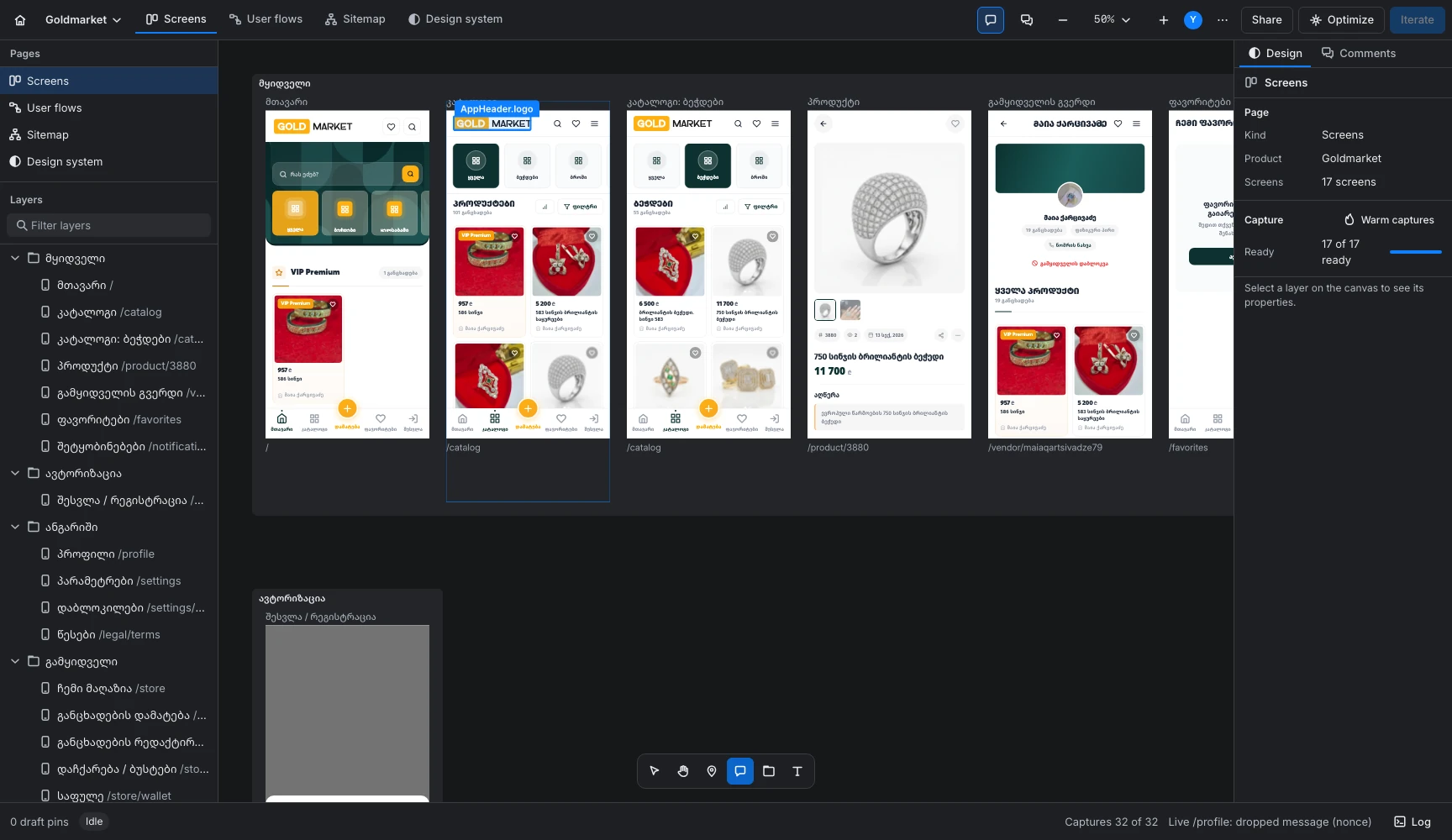
Every screen is the running build, captured on real devices. When the product changes, the canvas already shows it.
CRABZLAB puts your running product on an infinite canvas. Point at anything and it knows the component. Your own AI ships the fix.
Measured on the same Mac as the old review board, with twelve live screens on the canvas. Point at a result to replay it.
from opening a file to a drawn canvas
with 12 live screens on the canvas
phones to 5K, with real pixel ratio, touch and user agent
when nothing on the canvas moves
automated tests across 14 packages, run Sep 17
Design tools hold drawings, feedback tools hold screenshots, agents hold the repo. Nothing holds the product itself.
Every screen is the running build, captured on real devices. When the product changes, the canvas already shows it.
Click the element. The note carries its name, route and box, so nobody has to guess which one you meant.
Send to iterate writes a brief that names the element and the screen. Your own AI reads it, so the fix lands where you pointed.
Four steps on one canvas. Every step leaves something the next one uses.
Routes, journeys, states, tokens and brand, side by side. All built from the same running product.
Screens in view run as the real product, up to twelve at once, so menus open and forms validate. The rest are fresh captures.
Start, steps, decisions and routed arrows, generated from the product's own links. Every step is a route that exists.
The same product walked by different people in different states, each row showing the screens that journey passes through.
Real routes grouped by area and ordered by depth from the entry. Routes without a screen show up in the health report.
Colours, type and components come out of the product's own tokens file and tags, not a separate style guide.
Each preset carries its true pixel ratio, touch and user agent, so the layout is the one people actually get.
Drop, paste or link pictures onto a moodboard in the same file, so direction and result sit one zoom apart.
Logo on every ground and each colour pair with its WCAG ratio. When a pair fails, you see it before a user does.
Hover the live product and every element tells you its name. Click, and the comment carries the component, box and route a developer or an agent needs.
Optimize reads the product behind your screens and writes the pages that describe it. One step, and one Undo.
Structure first, offlineRoutes, links, tokens and tags come straight from the code. No network needed.
Your AI names, never invents In buildOnce connectors ship, your CLI names journeys. It cannot add a route that does not exist.
Safe to run twiceKeep my edits is on by default. A second run changes nothing.
Send to iterate writes a precise brief into your repo. You run the coding agent you already use on it, and the screens catch up.
In buildStarting your CLI from inside CRABZLAB, without a terminal.
Optimize writes a small map of the product into your repo. The agent opens the index, then only the area it needs.
review/context/, next to your code.The desktop app and the web app are the same code, so the canvas, pins and pages behave the same. macOS runs today as a preview build. Tablets come next.
Each category does one part well, and we mark where it leads. CRABZLAB puts the parts around your running product, on one canvas.
Where CRABZLAB is not there yet
Reviewing one file with teammates across accounts and devices.
macOS 0.2.9 is a preview build today. The others run the same code and are in build.
A URL gives captures of every screen. Live frames and component names need a local build.
Categories, not products. Our reading of each one, checked on 16 September 2026. Tools move fast.
Every macOS build since Sep 16, with what changed. Reviewing the running product works today. Creating on the same canvas comes in the phases after it.
Commits per hour from the repository history, times in UTC+4. Each tick is a release, and 0.2.1 and 0.2.2 share one, a minute apart.
The fine-tune half: review the running product, comment, iterate with your AI.
Local, not signed in
Exit gateWe review our own products, Goldmarket among them, in CRABZLAB instead of the board it grew out of.
iPad and Android tablet from the same web bundle. Pinch, two-finger pan, long-press to comment, panels as sheets.
Exit: comment a file on iPad with Pencil while it is live on desktop.
Record scenarios from the live frame, a redline overlay, onboarding that tags your app.
Image, video and asset generation on the canvas, a brand kit per product, credits metered.
A live page becomes layers, a change becomes a code proposal, CSS applies live.
Present mode, plugins, WebGPU, billing.
Phases from the product's roadmap doc, revised Sep 16, 2026.
Every plan opens the whole tool: the live canvas, all eight pages, pins and Optimize. Plans differ by iterate runs, projects and seats.
Planned. Billing ships in phase 7 of the roadmap.
One person with a few products.
People who ship every week.
Small teams and agencies.
It does not matter how many comments or screens it carries. They all travel in the same brief.
LATEST.md, STATUS.json and a crop per pin, under one timestamp.STATUS.json. The bar checks it every 5 seconds.General11 general note/catalog32 pins, 1 screen note. The pin with no comment is left out./product/12322 pins/store/product/new21 pin, 1 screen noteSTATUS.json moves through
LATEST.mdFrom the iterate package's test run: 3 screens, 6 pins with one left blank, 2 screen notes and 1 general note.
Setup, your data and how the loop works. Where macOS 0.2.9 stops short today, the answer says so.
A Mac with Apple silicon on macOS 13 or later, and your product: a web build in a folder, or its public URL. Captures run in a Chromium-family browser. If none is installed, CRABZLAB downloads Chrome for Testing into its own folder on the first capture. The fix loop also needs one AI CLI, signed in as you.
A web build that CRABZLAB serves from a folder on your machine, such as an Expo web export or plain static HTML. A public URL works too, with one limit: CRABZLAB cannot inject its agent into a site it does not serve, so a live site gets captures and no live frames.
| Feature | Local build | Public URL |
|---|---|---|
| Captures of every screen | Yes | Yes |
| Live, clickable frames | Yes | No |
| Pins that name the component | Yes | No |
No. Captures, live frames and pins work on the build as it is. An untagged element is still pinned with its selector, box and styles, under a guessed name like ? primary button. Add data-testid="Button:primary" and the pin carries the real component name. Optimize writes a tagging plan that ranks the elements still missing a tag by how often pins land on them.
When CRABZLAB serves your build it injects a small script, agent.js, into the live screen. It reads the element under the cursor: its selector, box, styles matched to your design tokens, and the component name from the nearest data-testid tag, with the chain of tagged parents above it.
One press of Send to iterate. Every draft comment that has text goes into one brief, LATEST.md, grouped by screen, with each pin's component, selector and box. STATUS.json tracks every pin while your agent works through them. A draft with no text is left out.
Not for drawing from scratch, yet. Today CRABZLAB is where you see, review and fix the running product and map its structure: screens, flows, sitemap and design tokens. A styles and components editor and then a vector editor are on the roadmap, on the same canvas.
Not in the desktop app. In 0.2.9, Send to iterate writes the brief, LATEST.md and STATUS.json, on your Mac for the AI CLI you run yourself, with your own subscription. Running that CLI from inside CRABZLAB is in build, and it stays on your machine: nothing is proxied. The web app, also in build, takes captures on a CRABZLAB frames server.
On your machine, for now. Files and comment threads are saved in the app's local storage. Captures are PNG files in the app cache, one folder per product, cleared when the product's build changes. Accounts and sharing across devices are in build now, in phase 1.
In 0.2.9 you run your own AI CLI on the brief, LATEST.md. The connectors in build know Claude Code, Codex CLI, Gemini CLI and OpenCode. They find each one on your PATH, give it a role (Iterate, Images or Research) and add MCP servers by command or URL.
macOS runs today as the 0.2.9 preview build. Windows, Linux and the web app are in build from the same code. Tablets come next as the web app installed on the device: touch and pencil first, for review and comments.
English and ქართული. Every interface string exists in both, and you switch in Settings. Components can carry aliases in both languages, and they show on pins and in Inspect.
Short for Crazy Businessman Lab. It started as the review board for our own products, Goldmarket first, and grew into a tool of its own.
Open the real thing, point at what matters, and let your own AI ship the fix.
macOS 0.2.9 preview buildApple siliconmacOS 13 or laterNo public download yet